
Mega System
Updated: 2026-06-17
MediaFire System
Updated: 2026-06-17

Mega Textures
Updated: 2026-06-17
MediaFire Textures
Updated: 2026-06-17

How to connect to L2Insolence

Using the link above, or click here, you can start to download the Lineage 2 High Five game files.
To install these, simply run the installer, click Next -> Next -> Next -> Finish, and you can move on to Step 2.
Download our system/textures files using the button above.
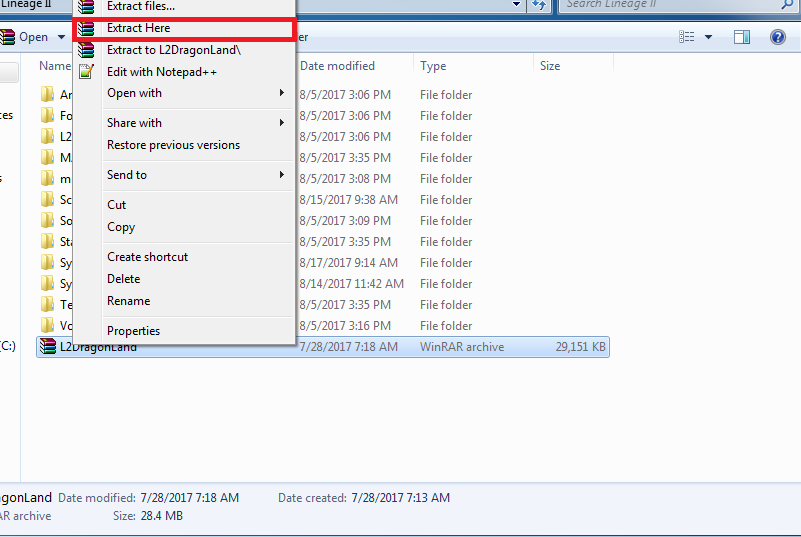
Place it in your Lineage 2 folder and "extract here".


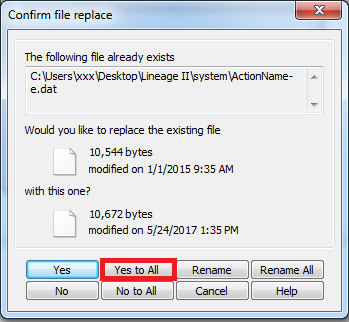
Make sure to allow it to overwrite all.

You should now be able to run l2.exe which is located in lineage 2/system folder.

We hope you enjoy your stay!

System requirements

Category Minimum Recommended
Processor CPU: Pentium 4 3.0GHz CPU: Pentium Core 2 Duo
Memory 1 GB 1 GB
Video Videocard: NVidia GeForce 6600 GT or ATi Radeon X1600Pro Videocard: NVidia GeForce 7600 GT or ATi Radeon X1800
Internet connection Yes Yes
DirectX 9c 9c
Operating System Windows XP Windows Vista / 7 / 8 / 8.1 / 10